Install
About a minute, and nothing is downloaded to your computer. Which assistant do you use?
Use more than one? Set up each - same account, same connections.
Claude · pluginSkill + connector, updates itself
Install the v-marketing-kit plugin
The plugin gives Claude the connector and the know-how for every source in one install. Works on claude.ai and in Claude Desktop; phones pick it up from the same account.
- Open Customize → Pluginsclaude.ai/customize/plugins in a browser - the Claude Desktop app does not always open the sign-in yet
- Press Add → Add marketplace and enter
arey325/marketing-kit-pluginShow me where
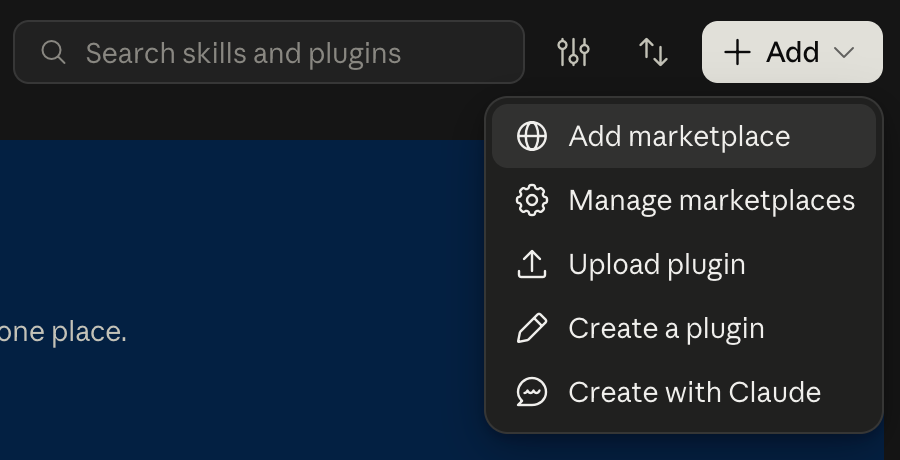
+ Add, top right of the Plugins page.Add marketplace - paste the address above and confirm. - Turn on Sync automatically, then search for the plugin by its name and press AddSync is how updates reach you; without it, press Check for updates now and then
v-marketing-kitWhat it looks like

The right one says from marketing-kit-plugin - press Add on it. Once installed it sits under Yours, as here. - Open the plugin → Connectors → Connect; sign in with Google or Meta and press AllowThe sign-in only identifies you - sources are authorized separately on Connections
Show me where
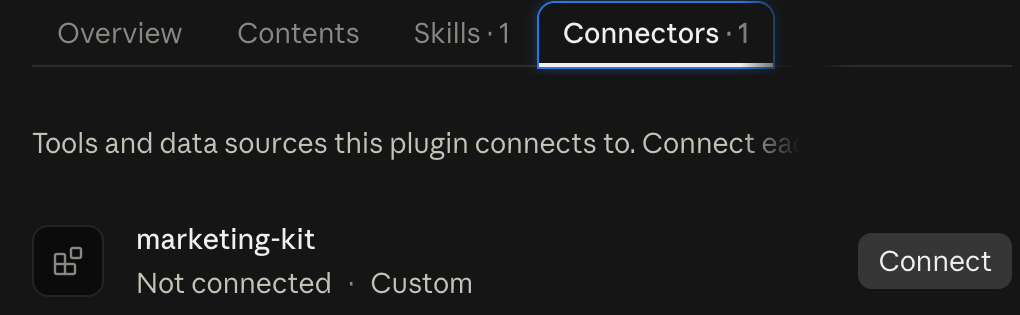
The Connectors tab inside the plugin.Connect opens the marketing-kit.app sign-in; press Allow. The line then reads Connected.
ThenBack on this site, authorize your sources on Connections and ask Claude. A good first message:
check v-marketing-kit statusWorking for several customers? One plugin is enough: add a client for each on Connections.
The plugin comes with your Claude account: in the phone app and in Claude Code signed in with the same account, V-Kit is there without another install. Terminal commands are in the Setup guide.
Using another app too?